
 We're happy to announce Libre Key Companion, a new open-source Android app for managing hardware security keys and cards from any manufacturer over NFC and USB. It allows to manage features like FIDO2 and OTP/OATH.
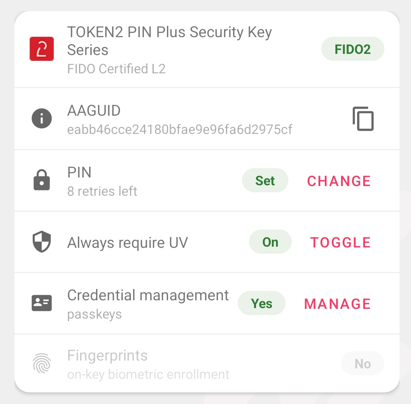
Libre Key Companion lets you inspect and manage what's on a security key from a single app: FIDO2/CTAP2 (PIN, alwaysUV, passkeys, fingerprint enrollment), OATH TOTP/HOTP, Token2 on-device OTP, and read-only views of the OpenPGP and PIV applets. It also looks up a key's FIDO Alliance metadata to show its certified name, certification level, and icon.
Why a new app, and not the existing Token2 Companion?
A fair question, since we already ship a companion app for our keys. The honest answer is that the two serve different goals.
Our existing Token2 Companion app has grown over years around our own product line.
It's older Java code, with plenty of Token2-specific behavior and device quirks baked
in. That's exactly what you want in a tool dedicated to getting the most out of
Token2 keys - but it's not a clean foundation to open-source as a general-purpose,
multi-vendor tool. Opening it as-is would mean publishing a codebase shaped around
one vendor's specifics, which isn't a good starting point for a community project.
So instead of retrofitting legacy code, we started fresh. Libre Key Companion is written cleanly in Kotlin, with a clear separation between the transport layer (NFC/USB), the protocol applets (CTAP2, YKOATH, OpenPGP, PIV, Token2 OTP), and the UI. Security-sensitive logic - the OATH algorithms, the CTAP2 PIN/UV crypto, the certificate parsing - is verified against published specification test vectors, not just eyeballed. That makes it a codebase others can actually read, trust, and build on.
Manufacturer-agnostic by design - but Token2 first
Libre Key Companion is built to support any FIDO2 key, not just ours. It speaks the open standards (CTAP2, YKOATH, the OpenPGP Card spec, NIST SP 800-73 for PIV), so it isn't locked to a single brand. In our own testing it already works with keys from multiple vendors.
Our commitment is simple: we prioritize Token2 devices - that's where our testing
and attention go first - but the project is open, and the community is free to add
and improve support for any key. If your favorite authenticator isn't fully
supported yet, the architecture is designed to make adding it straightforward, and
contributions are welcome.
What it does today
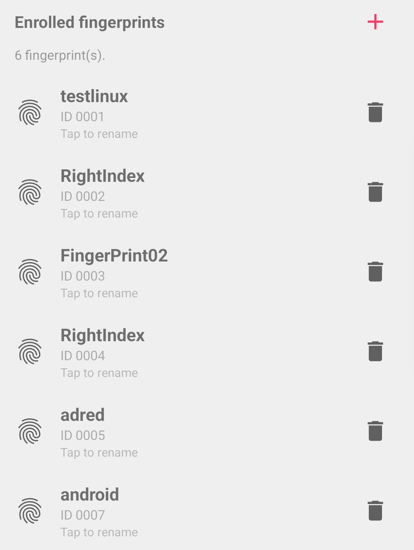
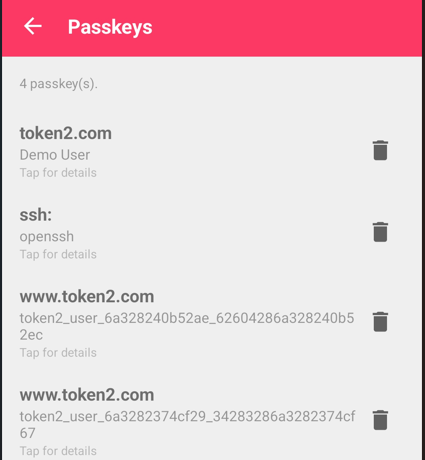
- FIDO2 / CTAP2 management - read authenticator info, set/change PIN, toggle alwaysUV, list and delete passkeys, and enroll/manage fingerprints on biometric keys.
- OATH (TOTP/HOTP) - list credentials with live codes, add by QR or
otpauth://URI, delete. - Token2 on-device OTP - manage OTP entries stored directly on Token2 keys.
- FIDO metadata - match a key's AAGUID to its certified name, level, and icon, with data bundled offline and updatable in-app.
- OpenPGP & PIV - read-only status: key/slot presence, algorithms, certificate details, retry counters.
It's deliberately a management tool - it does not act as a system passkey/credential provider for signing in to websites. For that, a dedicated credential-provider app is the right companion.
A note on scope
Libre Key Companion is beta software. The features above work and have been tested on
real hardware, but it's pre-1.0, so we recommend testing on a spare key first, as the
app and its documentation develop.
Get involved or start using right away
The project is on GitHub at
github.com/token2/librekeycompanionTry it with your keys, report what works and what doesn't, and - if you'd like to see a particular authenticator supported - open an issue or a pull request. The USB diagnostics built into the app produce exactly the information we need to help. We think a clean, open, standards-based key manager is good for everyone who uses hardware security keys, whatever brand they carry. We're glad to get it into the community's hands.
The app is available on Google Play and can also be downloaded as a standalone APK from the repository's Releases section.

updates tools
Subscribe to our mailing list
Want to keep up-to-date with the latest Token2 news, projects and events? Join our mailing list!