Buy options
6.43 USDPlease check product and platform compatibility before placing an order
All pictures shown are for illustration purpose only. Actual product may slightly vary due to product enhancement or other reasons.
TOTPRadius user license
About TOTPRadius
TOKEN2 TOTPRadius provides the RADIUS RFC-2865 for TOTP RFC-6238 based authentication. With TOTPRadius you can integrate a large variety of third-party products and systems with multifactor authentication. It works with numerous products and services like Cisco Meraki, Citrix XenApp/XenDesktop, VMWare View, and many others that provide support for RADIUS servers to validate the second factor for user authentication.
TOTPRadius user licenses are per-user and perpetual. Perpetual licenses do not expire, so you can continue to use the appliance as long as you want. Currently, these licenses are including access to product updates within the same version branch and regular technical support.
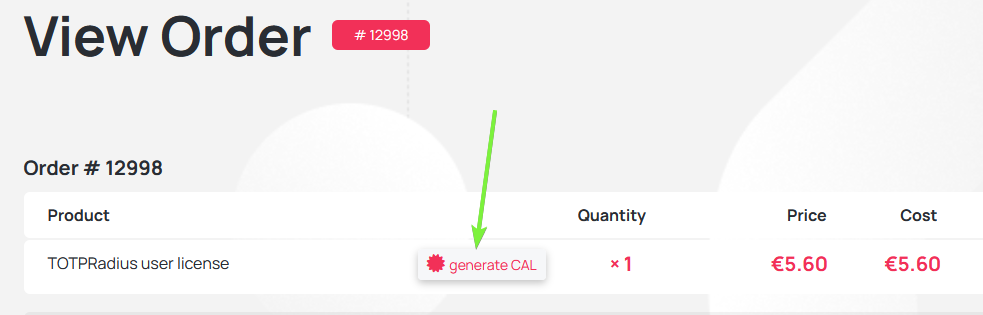
How to generate the license key
After completing the purchase you will receive an email containing the order URL. To generate the TOTPRadius user licenses, click on the "generate CAL" button on the order page and provide the Host ID. The license key will be generated and sent to your email address.

Blog
14-07-2026
token2-fido-bridge: NFC and smartcard FIDO2 devices on Linux
 Linux does not allow using non-USB transport for FIDO2 natively. We're happy to announce token2-fido-bridge, a small open-source tool that finally lets browsers on Linux use FIDO2 credentials stored on NFC and contact smartcards for WebAuthn.
28-06-2026
Libre Key Companion: manufacturer-agnostic security key manager for Android and iOS
 We're happy to announce Libre Key Companion, a new open-source companion application for Android and iOS that lets you manage hardware security keys and smart cards from any manufacturer.
17-06-2026
An open-source, cross-platform way to manage your Token2 keys: Companion App - Rust edition
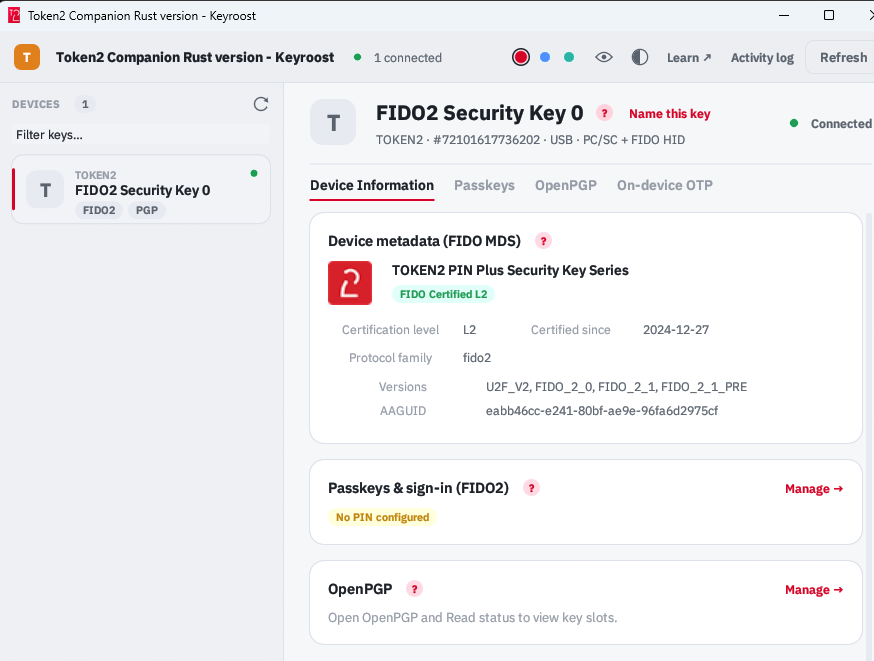 Token2 Companion - Rust edition - an open-source, cross-platform desktop tool for managing Token2 keys, and keys from other vendors too. It runs on Windows, macOS, and Linux, and the whole thing is open source: you can read it, audit it, build it, and extend it.